For corporate, government, and education teams
Know exactly what is failing, and what to fix first
We test your courses, LMS, and authoring tools against WCAG 2.2 Level AA, then hand you a prioritized list of what is failing and what to fix first.
.webp)
The right fit
Who this is for
Corporate L&D
Training global organizations across industries. We build the new courses and rebuild the ones already rolled out.
Government agencies
State and local teams working to fixed ADA Title II deadlines, where WCAG 2.2 conformance has to be documented rather than assumed.
Higher education
Instructional designers supporting faculty. We design across platforms, so accessibility isn't bolted on after the term starts.
K-12 districts
School leaders and educators responsible for digital learning content across multiple schools.

Building something new rather than reviewing what exists? Accessible course design is the better starting point. Already know what is broken? Start with remediation.
The problem
What usually goes wrong
Automated checkers return zero errors on content a screen reader user cannot get through. Overlays promise a fix and quietly make the experience worse. Meanwhile the person who raised the concern internally is left defending a problem they cannot measure.
A passing scan is not the same as usable content
Our approach
How we work
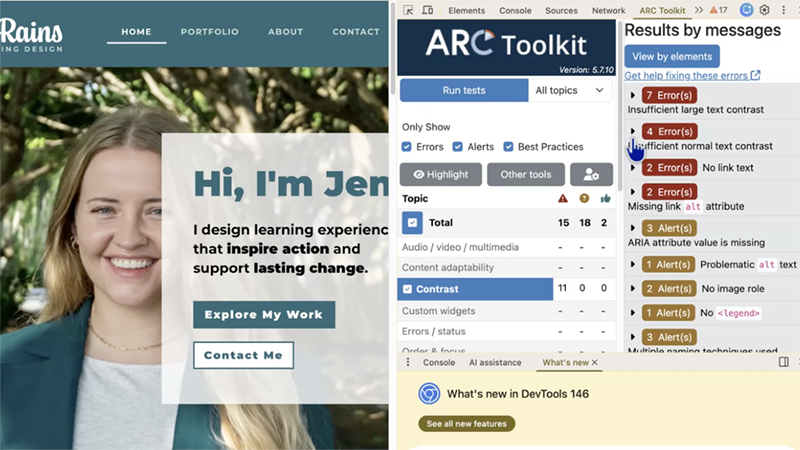
Automated testing, manual testing including keyboard navigation and screen reader testing, and a functional review.
We also verify vendor VPATs: comparing a tool against its published conformance claims and confirming them through user testing, so you learn whether the document holds up when someone using a screen reader or keyboard actually tries to use the product.
NVDA
VoiceOver
Keyboard
WAVE
ARC Toolkit
The deliverable
What you receive
Audit report
Prioritized findings with severity ranking, evidence, and specific remediation guidance.
Manual testing
Keyboard navigation and screen reader testing across your content, LMS, and authoring tools.
Live review session
A working session walking your team through the results, recommendations, and next steps.
The process
How it works
Send us your content
Courses, documents, LMS access, and any authoring tools in scope.
We test and rank
Manual screen reader and keyboard testing alongside automated tooling, with every finding ranked by severity.
Walk through it together
A live review session, so your team leaves knowing what to fix and in what order.
Investment
$3,500 to $12,500
- Learning content only: $3,500 to $6,500 USD
- Content, LMS, and up to three authoring tools: $7,500 to $12,500 USD
- Additional authoring tools beyond three: $1,000 to $1,500 USD each (tested as part of a full audit; findings included in the audit report)
- VPAT verification: $2,500 to $3,500 USD per authoring tool (standalone review of the vendor's VPAT/ACR, hands-on testing of its claims, and a written report showing where the tool matches or contradicts the ACR)
"I reached out and hired Dr. Nicole L’Etoile, IAAP, to review a Storyline module I created for an accessibility audit. I received a comprehensive report and a follow-up video chat within a few days. I was impressed with the report’s thoroughness and how easily Nicole explained the issues that needed to be resolved. Nicole and I connected on LinkedIn six months ago and had several video chats and many DMs. We built trust throughout, and I’m so happy I could engage in her services. As you might guess, I highly recommend her for any accessible audits you may need."

FAQs
Common questions
Still deciding? A short call sorts it out faster than reading.
Schedule a ConsultationMost engagements run 4-6 weeks depending on how much content is in scope. We confirm the timeline before work starts.
Automated tools catch only a portion of accessibility issues. They cannot judge whether alt text is meaningful, whether reading order makes sense, or whether a custom component actually works with a keyboard. That is why every audit includes manual testing with a screen reader and keyboard.
Remediation is a separate service. Many clients audit first, then decide what to hand off and what to fix in house.
An audit evaluates content you own. VPAT verification tests a vendor's product against the accessibility claims in their own documentation, so you learn whether those claims hold up before you buy or renew.
.svg)
Not sure this is the right service? Compare all six services to find the one that matches where you are.
Next step
Ready to find out where you stand?
A short conversation is usually enough to scope the work and give you a real number.
Schedule a ConsultationOther services
Professional Development
Live training delivered to your team, built around your own content, tools, and platforms.
Accessibility Remediation
We fix accessibility barriers in the presentations, documents, PDFs, and courses you already have.
The One-Hour Consult
One hour, your project, expert feedback you can act on immediately.
Accessible Course Design
We build courses and digital content that meet WCAG from the first draft, not as a retrofit.